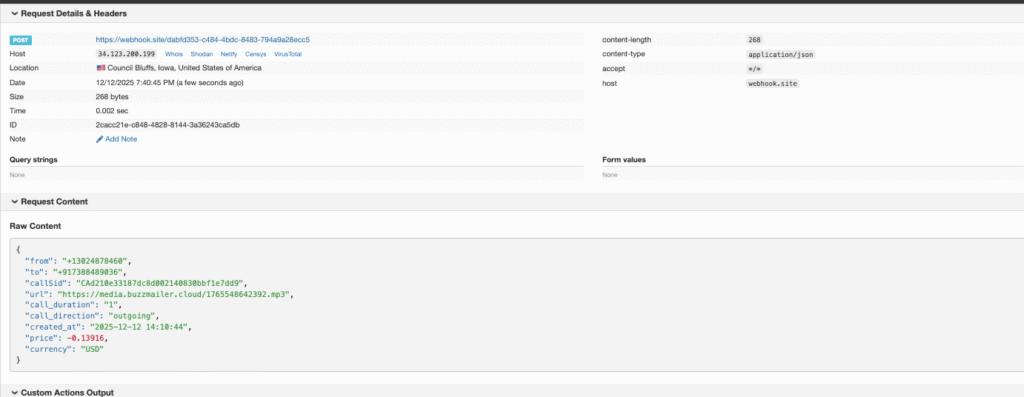
TThis documentation describes the simple webhook-style API used to initiate a single voice call without needing to set up a campaign first.
Endpoint
| Method | URL | Description |
| POST | https://campaigns.crm-messaging.cloud/api/voice-call | Initiates a single voice call. |
Authentication
Authenticate your request by including your CRM Messaging Token in the Authorization header using the Bearer scheme.
Authorization: Bearer YOUR_CRM_TOKEN
Request Body
The request body is a JSON object containing the call parameters.
JSON
{
  "toNumber": "917388489036",
  "fromNumber": "13024878460",
  "content": "Hello Natrajan Jaiswal this is a test call, how are you? If you want to talk to me, drop a message",
  "messageType": "text",
  "voice": "Polly.Joanna"
}
Request Body Fields
| Field | Type | Required | Description |
toNumber | string | Yes | The phone number to call (e.g., "917388489036"). |
fromNumber | string | Yes | Your sender phone number, which must be associated with your account (e.g., "13024878460"). |
content | string | Conditional | The text content to be converted to speech. Required if messageType is "text". |
messageType | string | Yes | Specifies the call content type: either "text" (Text-to-Speech) or "audio" (Audio Playback). Defaults to "text". |
voice | string | No | The specific AWS Polly voice to use for Text-to-Speech (defaults to "Polly.Joanna"). |
audioUrl | string | Conditional | A publicly accessible URL of the audio file to play. Required if messageType is "audio". |
Examples
Example 1: Text-to-Speech Call (Default)
Bash
curl -X POST https://campaigns.crm-messaging.cloud/api/voice-call \
  -H "Authorization: Bearer YOUR_CRM_TOKEN" \
  -H "Content-Type: application/json" \
  -d '{
    "toNumber": "917388489036",
    "fromNumber": "13024878460",
    "content": "Hello, this is a test call from CRM Messaging.",
    "messageType": "text",
    "voice": "Polly.Joanna"
  }'
Example 2: Audio File Playback Call
Bash
curl -X POST https://campaigns.crm-messaging.cloud/api/voice-call \
  -H "Authorization: Bearer YOUR_CRM_TOKEN" \
  -H "Content-Type: application/json" \
  -d '{
    "toNumber": "917388489036",
    "fromNumber": "13024878460",
    "messageType": "audio",
    "audioUrl": "https://example.com/audio.mp3"
  }'
Responses
Success Response
A successful request confirms the call initiation. Final call status and recordings are sent via webhooks.
JSON
{
  "success": true,
  "message": "Voice call initiated successfully",
  "data": {
    "messageId": "693c12afbab4b9f59fe36bf4",
    "callId": "CA1234567890abcdef",
    "toNumber": "917388489036",
    "fromNumber": "13024878460",
    "status": "sent",
    "callStatus": "queued"
  }
}
Error Responses
| HTTP Status | Scenario | Example JSON Response |
| 400 Bad Request | Missing Required Field | {"success": false, "message": "toNumber is required"} |
| 403 Forbidden | Sender Not Found | {"success": false, "message": "Sender not found for number: 13024878460"} |
| 500 Internal Server Error | Provider Not Found | {"success": false, "message": "Provider details not found for the sender number"} |
| 500 Internal Server Error | Call Failed | {"success": false, "message": "Failed to make voice call", "error": "Error message details"} |
Postman Setup Guide
- Method:
POST - URL:
https://campaigns.crm-messaging.cloud/api/voice-call - Headers:
- Key:
Authorization| Value:Bearer YOUR_CRM_TOKEN - Key:
Content-Type| Value:application/json
- Key:
- Body (raw JSON):JSON
{ "toNumber": "917388489036", "fromNumber": "13024878460", "content": "Hello, this is a test call from Postman.", "messageType": "text", "voice": "Polly.Joanna" }
Available Voices (AWS Polly)
The voice parameter allows you to select a specific Text-to-Speech voice. The default is Polly.Joanna.
Polly.Joanna(Default)Polly.MatthewPolly.AmyPolly.BrianPolly.EmmaPolly.JoeyPolly.JustinPolly.KendraPolly.KimberlyPolly.Salli- And many more…
Key Features and Webhooks
| Feature | Description |
| API Method | Makes a single call per API request. |
| Campaign-Free | Direct call initiation without prior campaign setup. |
| Record Tracking | Creates a Message record in the database for tracking purposes. |
| Auth | Uses your existing CRM Messaging token for authorization. |
| Text-to-Speech | Converts text to voice using AWS Polly. |
| Audio Playback | Supports playing audio files from a specified public URL. |
| Status | Tracks call status (e.g., queued, in-progress, completed) via webhooks. |
| Recording | All calls are automatically recorded. |
Important Notes on Webhooks
To receive call status updates and the URLs for call recordings, you must configure your external endpoint within the developer console.
- Configuration Path: Developer Console -> Update Callback URL -> Voice Logs URL
- Data Received: Your configured URL will receive detailed information about the call’s final status and the link to the call recording.